assctl is a Go library and command-line tool for Advanced SubStation Alpha subtitles, the .ass files FFmpeg and libass burn into video. Give it subtitles that already have timing, either an existing .ass or a JSON list of timed lines, and it gives back a styled script: a real font, colors, a background or outline, placement that clears the TikTok, Shorts and Reels buttons, and optional karaoke tags. It also inspects, edits and validates scripts you didn’t make with it, and burns the finished captions into the video.
Here’s the before. Take a perfectly normal SRT file with two lines in it and let FFmpeg convert it, which is what half the caption pipelines on the internet do:
ffmpeg -i before.srt before.ass[Script Info]
; Script generated by FFmpeg/Lavc63.1.102
ScriptType: v4.00+
PlayResX: 384
PlayResY: 288
[V4+ Styles]
Format: Name, Fontname, Fontsize, PrimaryColour, ... MarginL, MarginR, MarginV, Encoding
Style: Default,Arial,16,&Hffffff,&Hffffff,&H0,&H0,0,0,0,0,100,100,0,0,1,1,0,2,10,10,10,1
[Events]
Dialogue: 0,0:00:00.00,0:00:02.50,Default,,0,0,0,,Nobody reads the captions you bury under the like button.
Dialogue: 0,0:00:02.50,0:00:05.00,Default,,0,0,0,,So stop putting them there.That file is valid. It’s also shit.
Before: Arial 16 on a 384 by 288 canvas
The PlayResX and PlayResY lines define the coordinate system every size and margin in the file is measured in. FFmpeg’s default is 384 by 288, a 4:3 box the size of a postage stamp. libass scales it up to whatever video you burn it into, so Arial 16 on a 288-pixel-tall canvas comes out at a reasonable height on a 1920-pixel vertical video, and every margin you try to tune is in units of a screen nobody has owned since dial-up.
Then there’s the font. Arial is a name, not a file. The machine that renders the video either has it installed or quietly substitutes whatever fontconfig finds first. On a Docker render box that’s usually some fallback sans you never chose, and you find out after the fucking video is already posted.
Before: captions under the like button
Alignment 2 with a vertical margin of 10 means bottom center, ten units from the edge. On a vertical video that’s exactly where the platforms put the account name and the post caption, with the like, comment and share column stacked up the right side. Here’s that file burned into a 1080 by 1920 frame, with TikTok’s unsafe zones painted red from the numbers assctl ships:
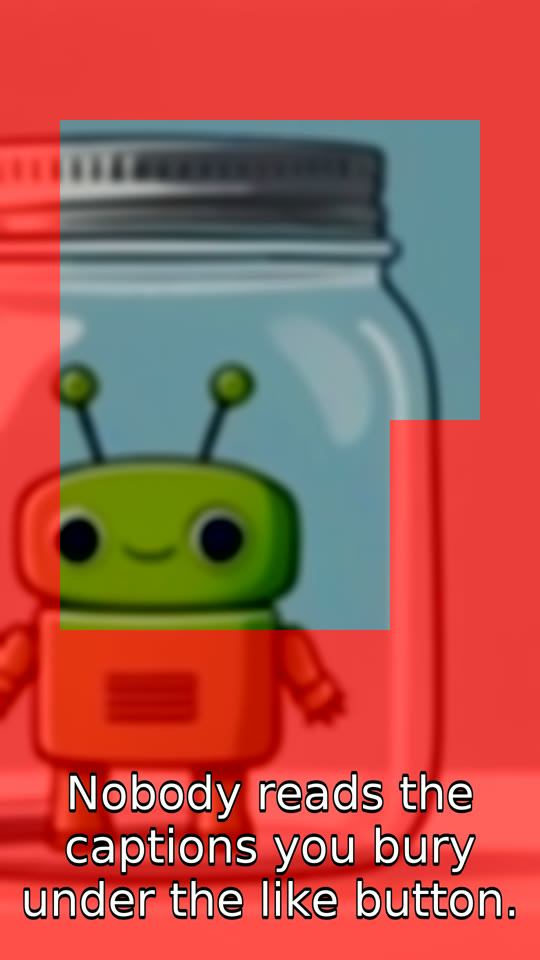
The text sits right in the red, where the platform’s own interface covers it. Nobody plans to bury captions there. It happens because the default says bottom center and nobody checked, because nobody had a damn thing to check it with.
Before: hand-editing style lines and backslash soup
Fixing it by hand means editing that Style: line, 23 comma-separated columns with no labels except the Format: line above them. Colors are hex in blue-green-red order with alpha first, so &H0053D4FF is gold and not some shade of blue you’d expect from reading it. Karaoke, fades and positioning are override tags like {\kf45} and {\pos(540,1100)\fad(200,300)} typed straight into the dialogue.
And libass is forgiving in the shittiest possible way. It doesn’t reject what it doesn’t understand, it ignores it. A typo in a tag just doesn’t render. An Effect field that says Scroll up without its numbers does nothing. A literal { in a line of dialogue opens an override block and swallows the text after it, so half a caption vanishes and nothing tells you why.
Before: fonts that exist on your laptop and nowhere else
Even when the style is right, the preview on your machine and the render on the server use different fonts if the server doesn’t have yours installed. Fancy caption fonts make it worse: TikTok Sans, Anton and Barlow Condensed are all free, all live in different places, and none of them ships with a stock Docker image. So you either bake fonts into every goddamn render image or accept that “styled captions” means “styled on my laptop, fuck knows on the server”.
After: a canvas the size of the video
Install it with Go 1.26 or newer. The source is on GitHub.
go install github.com/psyb0t/assctl/cmd/assctl@latest
assctl fonts-install
Or skip Go entirely. The psyb0t/assctl Docker image, for amd64 and arm64, carries the binary, FFmpeg with libass and every preset’s font already verified and installed, and needs no network at run time. Mount the working directory at /work and run as yourself so the files it writes are yours:
docker run --rm --user "$(id -u):$(id -g)" -v "$PWD:/work" psyb0t/assctl \
  captions --preset tiktok-bold --spec timing.json --output captions.ass
The same two lines go in as timed JSON. Durations are nanoseconds, because that’s what Go’s time.Duration marshals to. assctl doesn’t do timing, it styles timing you already have, whether it came from an editor, a transcript or a speech recognizer like Talkies:
{
  "Title": "Like button",
  "Width": 1080,
  "Height": 1920,
  "WordsPerLine": 4,
  "Uppercase": true,
  "Dialogues": [
    {"Start": 0, "End": 2500000000, "Text": "Nobody reads the captions you bury under the like button."},
    {"Start": 2500000000, "End": 5000000000, "Text": "So stop putting them there."}
  ]
}
assctl captions --preset tiktok-bold --embed-preset-fonts --spec timing.json --output after.assPlayResX: 1080
PlayResY: 1920
Style: Text,TikTok Sans,80.64,&H00FFFFFF,&H0000E8FF,&H00000000,&HFF000000,-1,0,0,0,100,100,0,0,1,4,0,2,120,300,768,1
Dialogue: 0,0:00:00.00,0:00:02.50,Text,,0,0,0,,NOBODY READS THE CAPTIONS\NYOU BURY UNDER\NTHE LIKE BUTTON.
Dialogue: 0,0:00:02.50,0:00:05.00,Text,,0,0,0,,SO STOP PUTTING\NTHEM THERE.The canvas is the video’s size, so a margin of 120 means 120 actual pixels. The font size, 80.64, is the preset’s 0.042 ratio of the height, and every number scales the same way at any resolution. There are 11 presets. Four are general looks: black-gold, ivory-navy, mint-plum and clean. Seven are built for vertical social video: tiktok-bold, reels-bold, shorts-impact, social-center, social-box, social-hook and the-bold. assctl presets --json dumps their full values, and any one of them saved as a file and edited becomes a --theme-file.
You don’t have to start from JSON either. If you already have an .ass, theme rewrites the style definitions and leaves everything else alone:
assctl theme --preset tiktok-bold --output themed.ass before.assRun on the FFmpeg file from the top, it swapped Arial 16 for TikTok Sans at 12.096, the same 0.042 ratio of that file’s 288-unit height, with matching margins. The dialogue, the timing, inline tags and every unrelated section stayed byte for byte. It’s a restyle, not a regeneration.
After: captions where people can see them
Same frame, same background, same red zones:
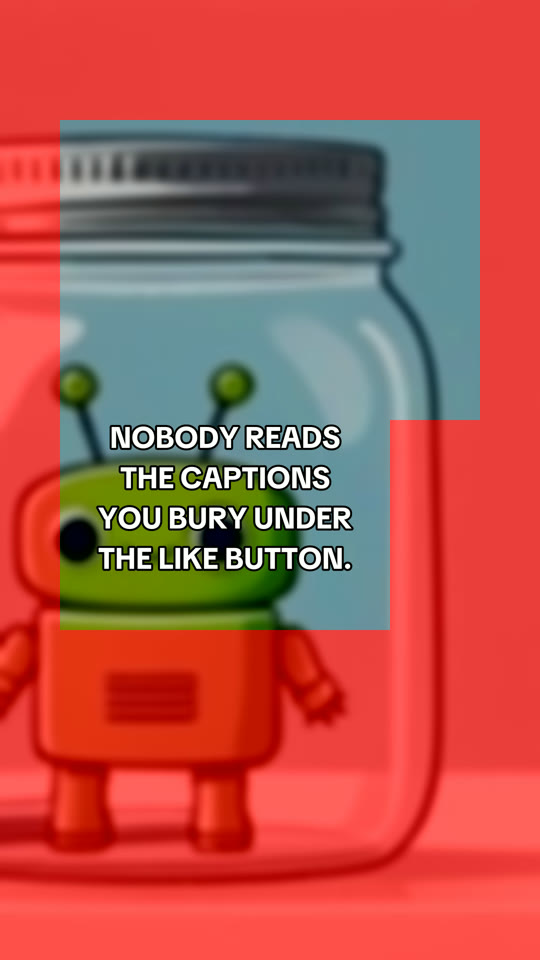
assctl captions --preset tiktok-bold.Those margins aren’t vibes. TikTok, Google and Meta all publish where their interface sits on a vertical video: TikTok’s In-Feed safe zone template, Google’s vertical video safe zones for Shorts and Meta’s Reels ad guide. assctl ships those as ratios. The lower presets use a left margin of 120/1080 of the width and a right margin of 300/1080, which clears TikTok’s button column, and margins round up to a whole pixel so nothing lands one pixel under a button at odd sizes.
And you can check any file, including ones assctl never touched:
$ assctl safe-area before.ass --platform tiktok
[
  {"Style": "Default", "Event": 0, "Edge": "bottom", "Margin": 10, "Required": 99},
  {"Style": "Default", "Event": 0, "Edge": "left",   "Margin": 10, "Required": 43},
  {"Style": "Default", "Event": 0, "Edge": "right",  "Margin": 10, "Required": 107}
]
execute assctl: 3 placement(s) reach outside the tiktok safe area: validation failed [...]
$ assctl safe-area after.ass
[]
It names the style, the event, the edge, the margin it found and the margin it needs, in units of the file’s own canvas, and exits non-zero when anything is wrong. --platform takes tiktok, shorts, reels or all, which is the default and the strictest of the three combined. Put it in the render script and a caption that would hide under the share button fails the build instead of the video.
Placement is separate from appearance. --text-position takes portrait-upper, portrait-center or portrait-lower-middle, and assctl position moves the styles in an existing file without touching their look. A line that already carries its own \pos keeps it.
After: typed tags and edits that refuse garbage
Override tags come out of typed JSON instead of your half-assed memory of the libass wiki:
$ echo '{"Karaoke":{"Mode":"kf","Duration":450000000}}' | assctl tags
{\kf45}
$ echo '{"SimpleFade":{"In":200000000,"Out":300000000},"Position":{"X":540,"Y":1100},"Blur":1.5}' | assctl tags
{\pos(540,1100)\blur1.5\fad(200,300)}
There are 49 typed override fields covering typography, colors and alpha, borders and shadows, scale and rotation, clipping, drawing, fades, transforms and the four karaoke tags. Garbage gets rejected instead of ignored. Put "In" where the schema has no such field and the JSON decoder refuses it. Ask for a negative font size and the encoder refuses that too. Ask for an Effect that libass would silently skip and the constant doesn’t exist, because 0.2.0 deleted every effect constant libass ignores and replaced them with ass.BannerEffect and ass.ScrollEffect, which build the field with the numbers it actually needs.
The other commands cover the rest of the dirty work. inspect prints the script settings, styles and events as JSON keyed by the file’s own column names, so a script or an agent can read a file without parsing comma soup. edit applies a JSON patch to chosen script settings, style columns and individual events, and a typed Override on an event prepends tags while keeping the text that’s already there. validate checks the structure, the style references and the event timing. captions escapes a literal { in plain dialogue, so a caption with braces in it shows all of its text.
All of it is the public Go package the CLI is built on, github.com/psyb0t/assctl/pkg/ass:
script := ass.NewScript("Intro", 1080, 1920)
script.AddStyle(ass.Style{
    Name: "Default", FontName: ass.FontDejaVuSans, FontSize: 64,
    ScaleX: 100, ScaleY: 100, Bold: true,
    BorderStyle: ass.BorderStyleOutlineDropShadow,
    Alignment: ass.AlignmentBottomCenter, Encoding: ass.EncodingDefault,
})
script.AddEvent(ass.Event{
    Start: time.Second, End: 3 * time.Second,
    Style: "Default", Text: "Hello, world",
})
position, err := ass.LookupTextPosition("portrait-lower-middle")
if err != nil {
    return err
}
positioned, err := script.WithTextPosition(position)
if err != nil {
    return err
}
return positioned.Encode(os.Stdout)
ass.Parse keeps a complete document, comments and unknown sections included, and Apply, Theme and EmbedFonts return a new one instead of mutating in place. Errors match with errors.Is and carry where they happened, courtesy of ctxerrors. That’s the [...commands.go:297 in main.cli.safeArea] trail in the output above. Ugly, but you know exactly which check said no.
After: the fonts ride along, all the way into the video
That --embed-preset-fonts flag is why the after frame rendered in TikTok Sans inside a stock FFmpeg container with no fonts installed. The FFmpeg image even complained it couldn’t find a fontconfig config, and it didn’t matter. The flag downloads the preset’s font and writes it into the script’s [Fonts] section in the format libass reads, which turned a 770-byte caption file into 228 KB. Every renderer with libass picks it up from there. --embed-font FILE does the same with any font file you have, on create, captions and theme.
fonts-install puts the preset fonts in your user font directory instead: under $XDG_DATA_HOME/fonts or ~/.local/share/fonts on Linux and FreeBSD, ~/Library/Fonts on macOS, and your per-user Windows font directory, registered so applications see them. Every download comes from the font’s upstream source, the DejaVu, TikTok Sans and Google Fonts releases plus the free version of THE BOLD FONT, and gets checked against a pinned SHA-256 before it’s installed. Each font’s license file goes in next to it. A failed download leaves the fonts you already had untouched.
Or let the Docker image be the render box, since it already has every preset font. The last step of the old pipeline was a hand-rolled FFmpeg command with a subtitles= filter and a pile of encoder flags you copied from a forum in 2019. Now it’s this:
docker run --rm --user "$(id -u):$(id -g)" -v "$PWD:/work" psyb0t/assctl \
  burn clip.mp4 --subtitles captions.ass --output clip-captioned.mp4
I ran that on a five-second 1080 by 1920 H.264 clip with an AAC tone, using a caption file with no embedded fonts at all. It took about a second, the captions came out in TikTok Sans from the fonts inside the image, and the output was still H.264, 1080 by 1920, 30 frames a second, same pixel format. The audio stream’s MD5 matched the original exactly, because it wasn’t touched.
That’s the contract. Drawing on pixels means the picture has to be encoded again, so burn encodes only that, with the source’s codec, resolution, frame rate, pixel format and color tags, at a quality meant to look the same: CRF 18 for H.264, 20 for HEVC and VP9, 23 for AV1, and --crf if you want to trade size for quality. Audio, other tracks, cover art, chapters and metadata are copied as they are. A sideways phone video with a rotation flag gets turned upright before drawing, so the captions don’t come out lying on their side. It writes to a temporary file and renames it only when FFmpeg succeeds, so a failed burn doesn’t leave half a fucking video behind. It doesn’t check that the script’s canvas matches the video’s shape, though, so a 16:9 script on a vertical clip gets stretched. assctl inspect shows the PlayResX and PlayResY, and theme or edit won’t fix a canvas you never looked at.
For agents there’s a skill that documents the installed command, packaged for Claude Code, Codex and OpenClaw:
claude plugin marketplace add psyb0t/agents
claude plugin install assctl@psyb0t
openclaw skills install @psyb0t/assctl
Before, a caption file was a guess about somebody else’s screen and somebody else’s fonts. After, it’s checked against the screen, carries its own fonts and burns itself in.
Get assctl on GitHub. The documentation covers the CLI, presets, safe areas, embedded fonts and the Go package.