Dear people with twelve charts open,
Multi Timeframe Indicator Suite is a charting indicator that puts higher-timeframe overlays and oscillator docks on the chart where you are actually making the decision. Every entry chooses its own timeframe, parameters and colours. Put an H4 Ichimoku cloud, a daily moving average, a weekly anchored VWAP and four stochastics on one M15 chart. They each keep their own clock while the chart keeps yours.
You do not need M15, H1, H4 and D1 copies of the same symbol tiled across two monitors like a bargain-bin air traffic control room. I built the suite because I was tired of that shit. Opening another chart is not analysis. It is window management wearing a trader costume.
You do not need another chart
The panel treats each indicator as a separate entry. Pick the indicator, pick its timeframe, set its parameters, then show it. Add the same indicator again with another timeframe if you want. There is no global timeframe switch that drags the whole layout somewhere else.
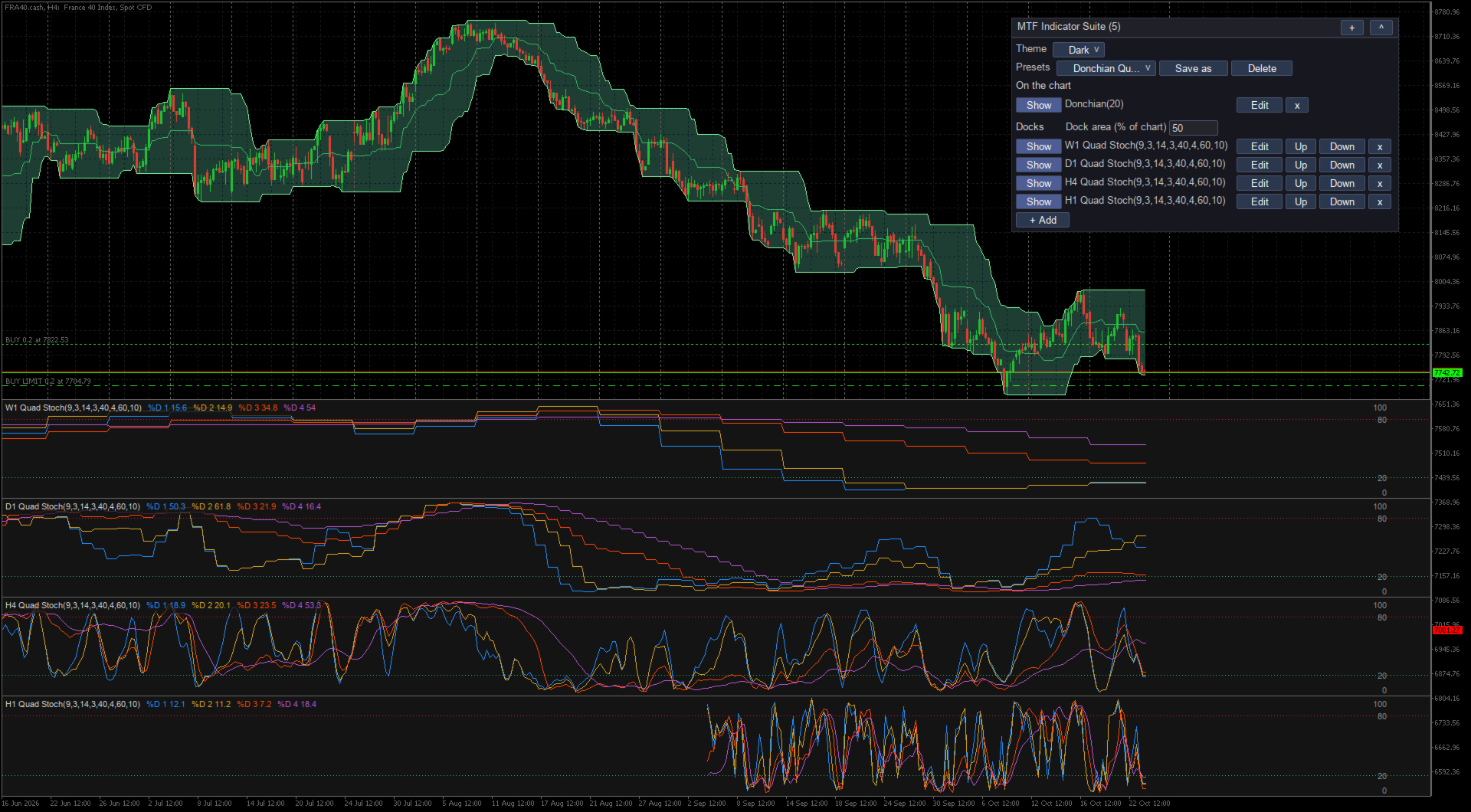
The calculation is deliberately boring. Every point comes from a closed bar on the entry’s own timeframe. On an M15 chart, an H4 line holds the last H4 value that was actually known at that M15 bar. It steps forward when another H4 bar closes. The unfinished H4 candle does not sneak into history and repaint the past so the indicator can look smarter than it was.
Smoothed indicators load extra history before drawing. I check the formulas bar by bar against pandas-ta, including the annoying warm-up behaviour of EMA, RSI and ATR. A timeframe that has not loaded yet says (loading) instead of drawing confident bullshit from missing data.
Stop building oscillator basements
MetaTrader normally gives every oscillator its own subwindow. Add enough of them and price gets squeezed into a letterbox while RSI occupies half the fucking screen. The suite puts oscillators into resizable docks at the bottom of the main chart. Candles stay above the dock area, each dock can hold one indicator, and several docks stack without spawning more chart windows.
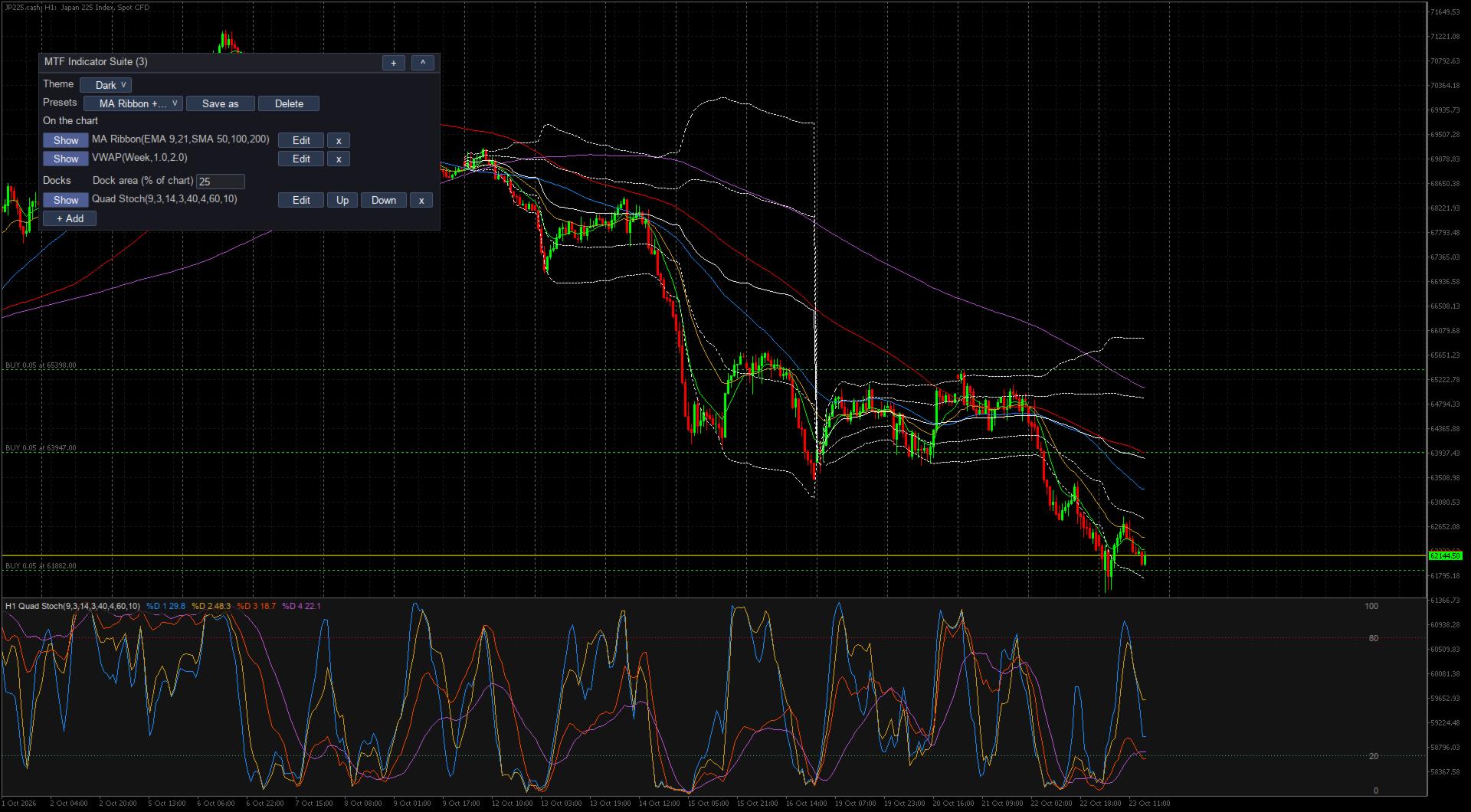
The dock list covers RSI, Stochastic, quad stochastic, Stochastic RSI, MACD, CCI, Williams %R, MFI, ADX with both directional lines, ATR, OBV and tick volume. Docks can use any timeframe even when it is below the chart timeframe. They are measurements, not a fake buy button.
The cloud is not a fucking sticker
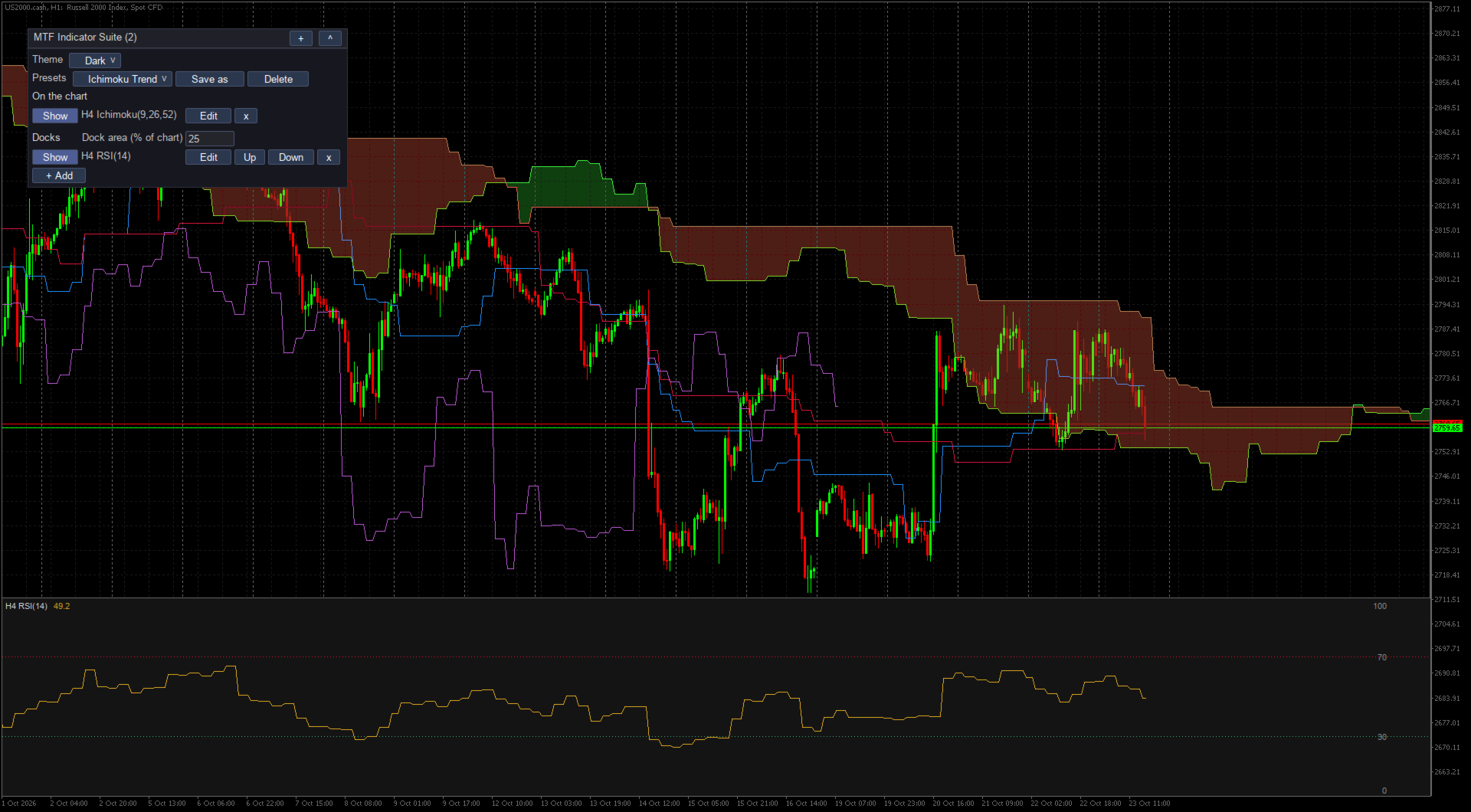
Ichimoku implementations love quietly dropping the awkward parts. This one draws Tenkan, Kijun, both spans, the projected cloud and the lagging span. The cloud is shifted ahead of price where it belongs. The lagging line is shifted back. Nothing gets flattened into two pretty lines because implementing the full thing was inconvenient.
Over the candles you can also use SMA, EMA, WMA, HMA, DEMA and TEMA, a five-line moving-average ribbon, Bollinger Bands, Keltner Channels, Donchian Channels, Supertrend, Parabolic SAR and anchored VWAP. MetaTrader 5 draws the cloud and band regions as proper fills. MetaTrader 4 draws the same boundaries as lines because it cannot fill those areas.
VWAP should remember the fucking anchor
Anchored VWAP can start at the day, week, month, quarter, year, or an exact date and time you type. Add bands at one and two standard deviations if you need them. Changing the chart timeframe does not move the anchor. Clicking around does not move it. An anchor that wanders when the interface feels like it is not an anchor. It is a suggestion.
The same rule applies to the rest of the layout. Entries, dock size and theme are stored per symbol. Restart the terminal and they are still there. Save a chart template containing the indicator and open it on another symbol, and the suite starts cleanly instead of dragging the previous symbol’s private state behind it.
The panel owns the fiddly shit
The indicator inputs contain two things: log level and how many days of logs to retain. That is it. Everything you change while looking at the chart belongs in the chart panel, not in MetaTrader’s modal input dialog where every edit feels like filing taxes through a keyhole.
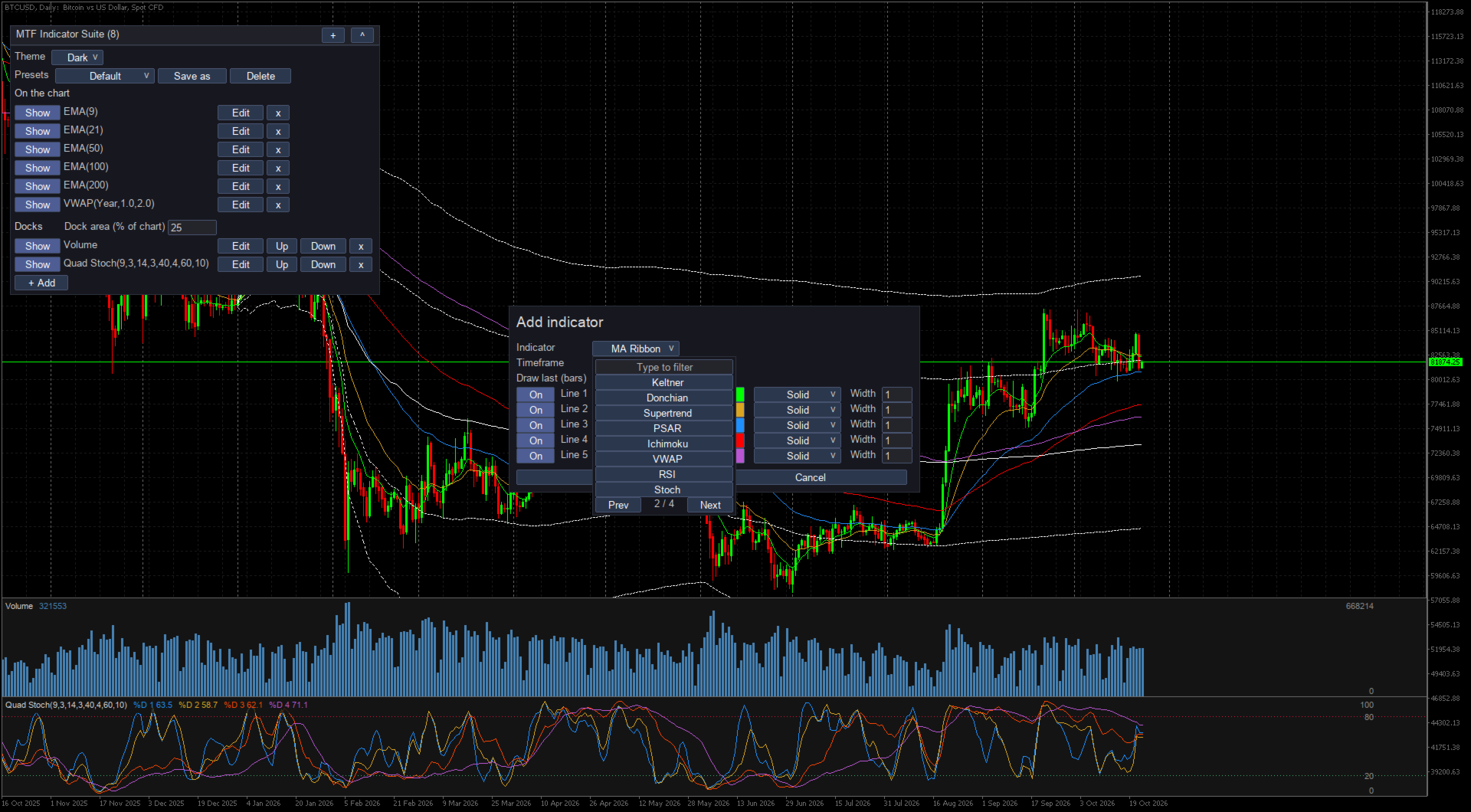
Each row has Show or Hide, Edit, movement controls and removal. Save as turns the current layout into your own preset. Built-in layouts cover Default, Ichimoku Trend, Scalper, Swing and Donchian Quad Stoch Stack, so a new chart does not begin as an empty bureaucratic form.
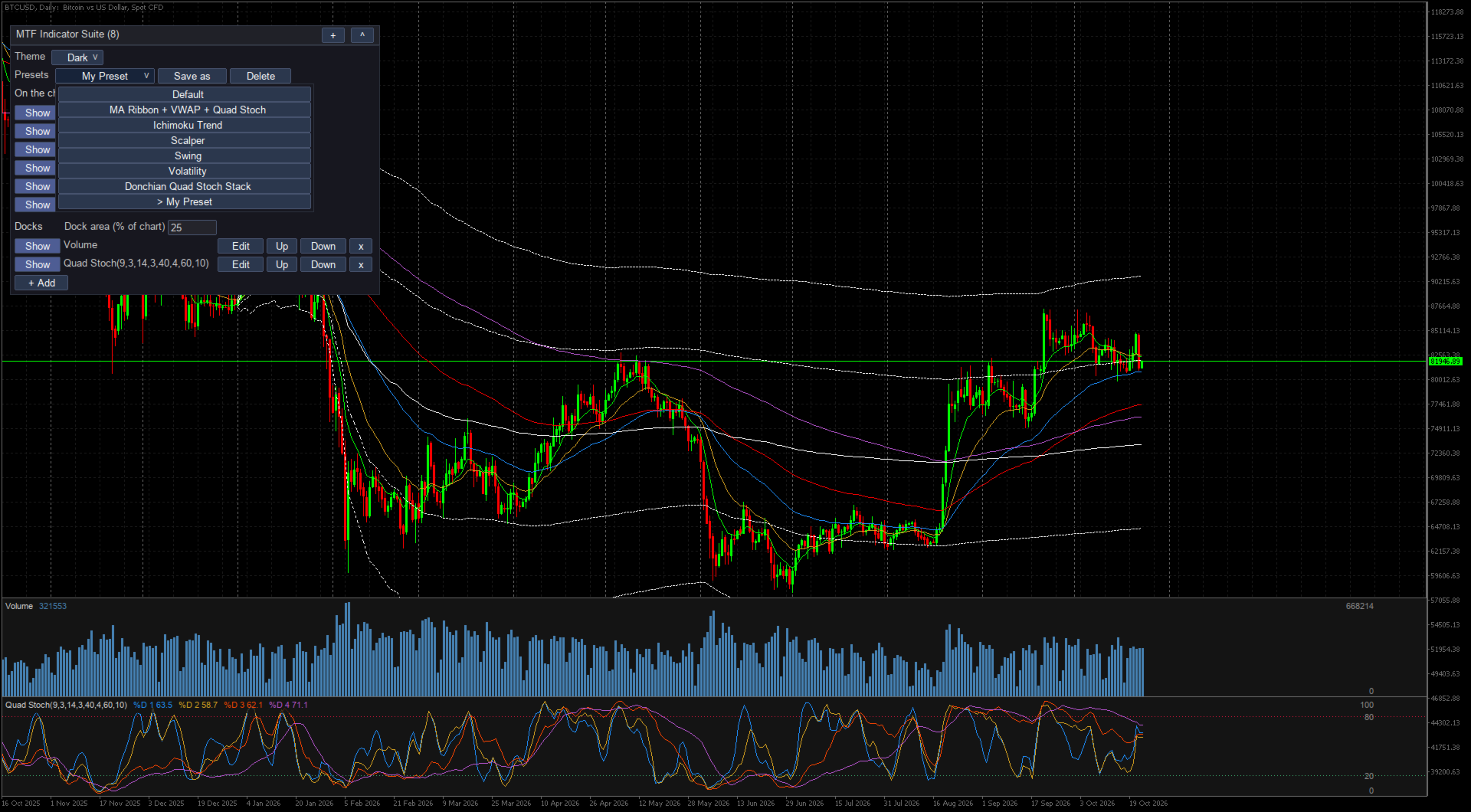
Dark and light themes cover the panel, editor and docks. A layout can hold up to 32 entries and 32 lines over price. Docks do not count against the line limit. MetaTrader 5 also allows up to 16 fills for Ichimoku clouds and the areas inside Bollinger, Keltner and Donchian bands. MetaTrader 4 draws those regions as boundary lines. Each entry draws the latest 500 bars of its own timeframe by default, and Draw last accepts another number or All.
Two actual limits
There are two limits worth knowing. A line from a timeframe below the chart is skipped, because drawing an M5 average on a D1 candle is ambiguous garbage. Docks still work on every chart. MetaTrader’s own volume display also does not work while docks are shown, so use the suite’s tick-volume dock instead.
Use one chart
- Download the current build from the MQL5 Market and attach MTF Indicator Suite to a chart.
- Choose a built-in preset, or click + Add and give each entry its own timeframe and parameters.
- Resize the dock area, save the layout under your own name, then stop opening duplicate fucking charts.
The suite is free on both terminal versions: MetaTrader 4 and MetaTrader 5.
Regards,
the chart you were already looking at.