ModemBox is a Docker app that turns a USB cellular modem on a Linux box into an SMS and voice gateway. Plug in a modem with a SIM and you get a browser console, a REST API and an MCP server that can send and read texts, inspect the radio and, on supported hardware, make calls and put the audio through your browser.
- Plug the old bastard back in.
- Read the fucking receipt.
- Make the inbox do the work.
- Give your scripts a phone line.
Plug the old bastard back in
My modem is a Huawei E173. Digi dropping 3G data killed the obvious job for that thing. Fine. I didn’t need another shitty dashboard that tells me how many megabytes I haven’t used. I wanted to be able to send a text from a Linux box and see the reply without picking up a phone.
Plug the modem in on a Linux host with Docker Compose, curl and OpenSSL. Keep other modem software off the same serial ports. Two programs arguing over which one gets to talk to the radio is a particularly stupid way to spend the evening.
curl -fsSL https://raw.githubusercontent.com/psyb0t/docker-modembox/main/install.sh | bash
modembox start
If the shell can’t find it, run ~/.local/bin/modembox start. Open http://localhost:8000 on the host. The installer puts a generated MODEMBOX_TOKEN in ~/.config/modembox/.env; paste that value into Access token. Look for Live, select the modem, and check its SIM and network state. Live means the browser is connected to ModemBox. It doesn’t mean your SIM has registered with the carrier.
If the SIM is locked, enter the PIN and click Unlock. Remember this SIM stores the PIN encrypted after a successful unlock, tied to that SIM’s ICCID. Automatic unlock needs a readable ICCID and a verified retry count of at least two. If the hardware won’t report that, enter the PIN yourself. Guessing is a fantastic way to turn a five-minute setup into a fucking PUK scavenger hunt.
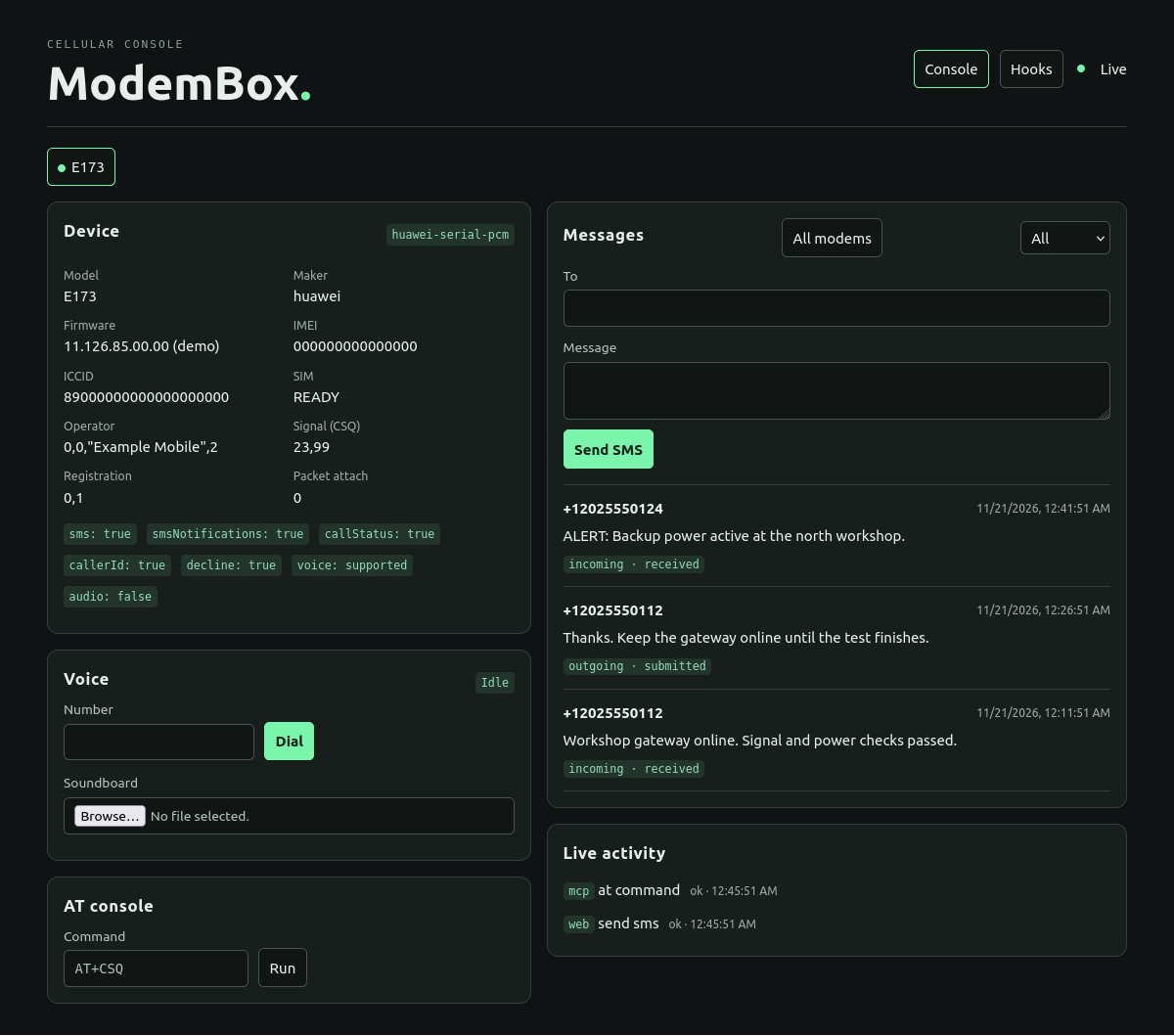
On the E173 layout I used, USB interface 02 handles AT commands and 01 carries voice audio. ModemBox recognizes known Huawei layouts. With another modem, check what the console actually reports and map the control port manually if discovery misses it. A usable IMEI gives an auto-discovered device a stable ID, and unplugging and reconnecting it doesn’t kick you out of its tab. None of that makes a carrier support a radio it has switched off. Check the SIM, registration and capabilities before blaming the app.
Read the fucking receipt
In Messages, enter a phone number you control, type something you’ll recognize, hit Send SMS, and reply from the other end. Switch between inbox and outbox to see both sides. Open a second browser tab and watch it update without refreshing. Send from a script instead and the outbox in both tabs still shows what happened.
Incoming multipart texts show up once all the pieces arrive. Incomplete parts survive a restart. Long outgoing texts are split too, but the outbox doesn’t pretend that a piece accepted by the modem is a piece delivered to a phone. submitted means the modem accepted it. partial means some parts were accepted before a later one failed. unknown means it might have gone out before the connection disappeared. Check the message’s parts in the detail API before hammering Send again and making someone’s phone sound like it’s trying to escape.
Calls live under Voice. Dial, answer, hang up. If the modem exposes call audio, click Listen during the call, grant microphone permission if you want to talk, or play a mono 8 kHz PCM16 WAV from the soundboard. A modem can report call status and still have no usable audio port. That’s why those are separate capabilities. Remote browser microphone access needs HTTPS.
Make the inbox do the work
Say a box texts you when something breaks. Open Hooks, make an incoming SMS rule, match its sender and the ALERT prefix, then forward the original body to a number you own or send it to a configured webhook. Preview the rule against a saved message before enabling it. The preview shows what would match and what it would send. It doesn’t fire the action. There’s no fucking reason to burn actual texts while figuring out whether you picked the right field.
Incoming calls and completed calls can trigger rules too. A missed call can get a short SMS reply. A decline rule only acts when the modem confirms one ringing incoming call and no other call. It doesn’t go around hanging up an active call because a rule happened to match a number. The call history and delivery log tell you what actually happened.
The hooks run without an agent. They can use fixed HTTP destinations with signed requests and delivery IDs, and the receiver can use the ID to ignore duplicates. Old inbox scans and repaired fragments don’t start firing your new rules. If an automated SMS can’t run while the modem is busy, it waits, subject to limits. A rule is for the boring shit that should happen every time; save the model call for work that actually needs one.
Give your scripts a phone line
With the token from the installer in your shell’s MODEMBOX_TOKEN, this is the read-only check I’d run before writing anything that sends a text. The modem IDs and capabilities in the response tell your script what it can use.
curl --fail-with-body \
  -H "Authorization: Bearer $MODEMBOX_TOKEN" \
  http://localhost:8000/v1/modems
For MCP, connect to http://localhost:8000/mcp over Streamable HTTP with the same bearer token and call list_modems first. You can also inspect messages and work with hooks there. The token gives operator access, so don’t hand it to a client you wouldn’t trust with the line. SQLite stores messages locally; the encryption for saved SIM PINs and webhook credentials isn’t a promise that the entire inbox is encrypted. Keep the database and its key private and back them up together.
The AT console is there when you need to ask the hardware something the UI doesn’t show. It defaults to a read-only allowlist; extra AT commands require an explicit opt-in and can’t run during a call. If you need the console from another machine, the installer also supports Tailscale HTTPS. The default port binding stays on loopback.
Now for the stupid thing I want to try: two ModemBoxes, one with internet and one without. The offline box texts GET example.com. The online one fetches a page and texts back numbered chunks. Put a stopwatch and a message counter on screen. If the first thing I get back is a fucking cookie banner, the experiment has succeeded in the worst possible way. That’s a demo idea, not a shipped feature or a replacement for the modem’s missing data connection.
Plug it in. Check what got sent. Put the inbox to work. Then see what else that old fucker can do.
Get ModemBox from GitHub. The documentation covers hardware, installation and hooks.